Integration Zen-Cart module for WebwinkelKeur
Follow the steps below to install the WebwinkelKeur module with Zen-Cart.
- Download the module from the Zen-Cart website.
- Upload the contents of the 'Includes' folder to your includes folder of your Zen-Cart installation.
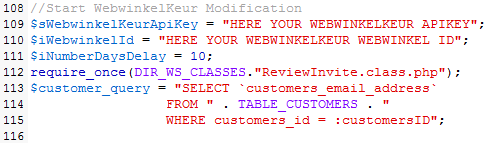
- Open the file includes/modules/pages/checkout_success/header_php.php and around line 108 adjust the configuration with your personal WebwinkelKeur ID and API key. This data can be found under 'Placing the trustmark' after logging into your WebwinkelKeur account.
- If necessary, adjust the number of days after which the customer receives the invitation. By default, this is set to 10 days after placing the order.
- Test the link and the operation of the webshop by placing an order. Then log in to WebwinkelKeur and check under 'Invitations' whether the invitation is also scheduled to be sent.
Below is the code with which the Zen-Cart module can be configured: