
Install WebwinkelKeur Widget on Shoppagina
To place the review widget on your Shoppagina webshop, follow these steps.
Step 1: Generate the widget code using the Widget Generator Wizard. Log in to the WebwinkelKeur dashboard and click on 'Installation' > 'Widget'. For more information about this step, read Generating the widget code
Step 2: Log in to your Shoppagina webshop .
Step 3: Click on 'Edit Webshop' and go to 'HTML snippets'.
Step 4: Under the heading 'Overview',select the 'Add' option.
Step 5: Type 'WebwinkelKeur' in the Description field and select 'No' for the 'WYSIWYG editor' option. 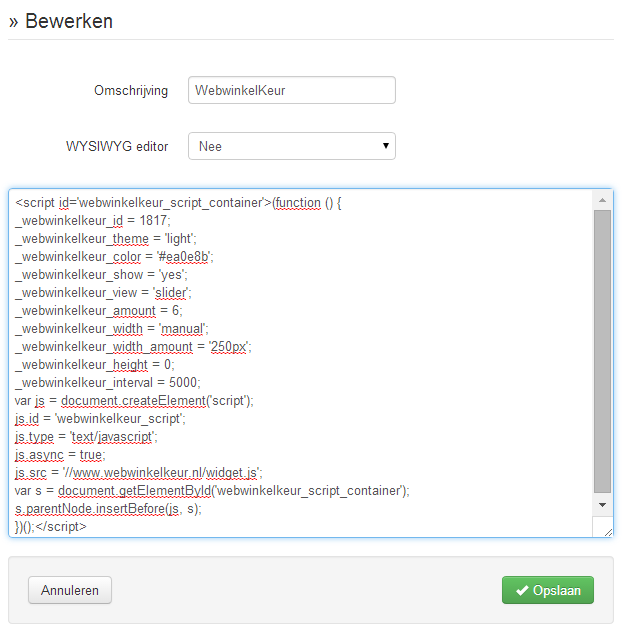
Placing the WebwinkelKeur widget snippetStep 6: Nowpaste the code you generated in the wizard in Step 1 into the text field and select 'Save'.
Step 7: Nowgo to 'Manage pages' at the top (left menu) and select 'Page overview'.
Step 8: Click on 'Edit' on the 'Webshop' page (or another page to add the widget there).
Step 9: Decide where you want to place the widget, for example 'Middle row', and click on 'New page element'.
Step 10: Select 'Dynamic content' and then the option 'A piece of reusable HTML' under the heading 'HTML snippets'.
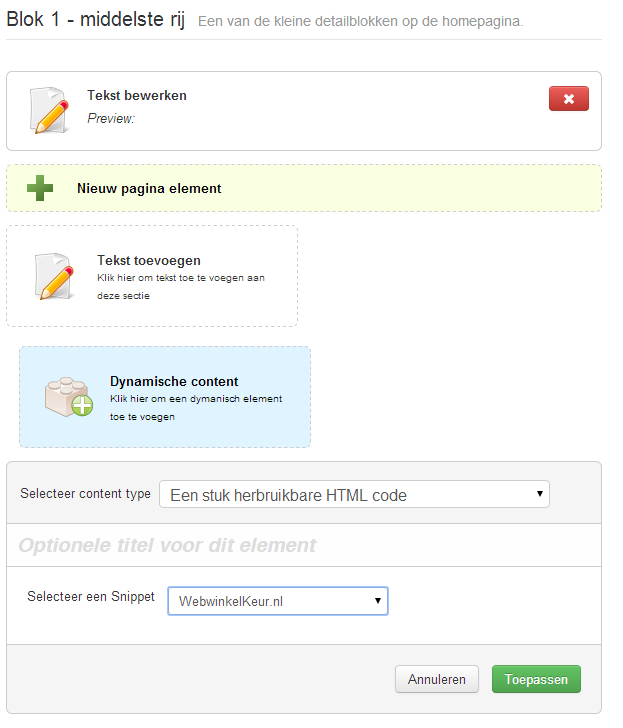
Dynamic content - A piece of reusable code
Step 11: Nowselect 'WebwinkelKeur' under Select a snippet.
Step 12: Click on 'Apply' and then 'Save' to save the changes.
Step 13: Nowview your online store and you will see the WebwinkelKeur widget appear!