
Installation module Shopping page rich snippets
Rich snippet stars are the stars in Google's organic search results (not the stars in Google Ads (formerly Adwords)). Rich snippet stars are primarily intended to display product reviews in search results, for example, in order to enrich the search results with other information. However, they can also be used to add stars to the front page of your webshop in search results. This is at your own risk, however, as Google's policy regarding the use of Rich Snippets may change in the future. Using rich snippets via Shoppagina is easy to set up. First, the Shoppagina link must be activated . After activating the link, the rich snippet code can be easily placed by following these steps: Step 1: Log in to your Shoppagina webshop. Click on 'Edit Webshop'.
Step 2: Nowgo to 'Manage Pages' at the top (left menu) and select 'Page Overview'.
Step 3: Click on 'Edit' on the 'Webshop' page.
Step 4: Decide where you want to place the rich snippet, for example, the 'Page footer'.
Step 5: Under 'External link', select the option 'WebwinkelKeur Rich Snippet'. 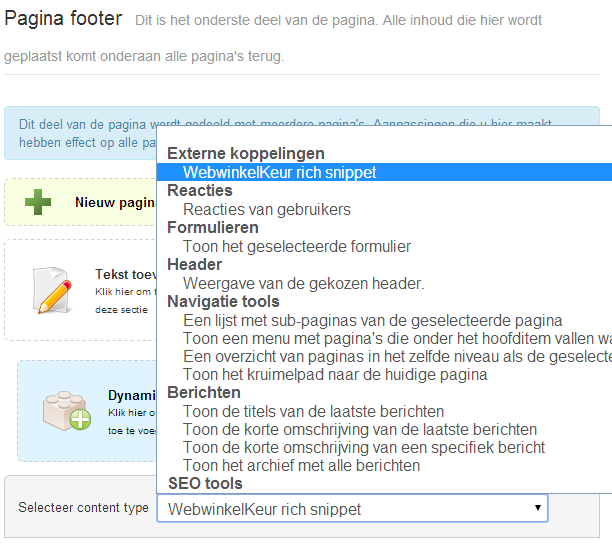
WebwinkelKeur rich snippets
Step 6: Click on 'Apply' and then 'Save' to save the changes.
Step 7: Nowview your webshop and you will see the Rich Snippet appear in the chosen location. Google then decides whether the stars will be displayed in the search results. This takes at least a few days, because Google has to index your webshop.